Spaces 1.0: your coding agents, one terminal

Recorded live: Claude Code and Codex building a small app in two spaces. Only the prompts are scripted.
Running one coding agent is easy. Running five is a pile of terminal tabs. The moment you look away, you lose track of which agent finished, which one is waiting on you, and which one is still going.
The first version of Spaces tackled that from the browser: a grid of web terminals with session history and a usage dashboard. People liked the dashboard. They didn't like leaving the terminal. The developers who run the most agents live in tmux, over SSH, on a box under a desk or in a closet, and a browser tab was one more place to look.
So we rebuilt it. Spaces 1.0 is terminal-first. Type spaces and you
get a native, full-screen terminal client. The browser is still there for
when you want it, and both show the same live agents.
npm install -g @jlongo78/agent-spaces
spaces
Every agent at a glance
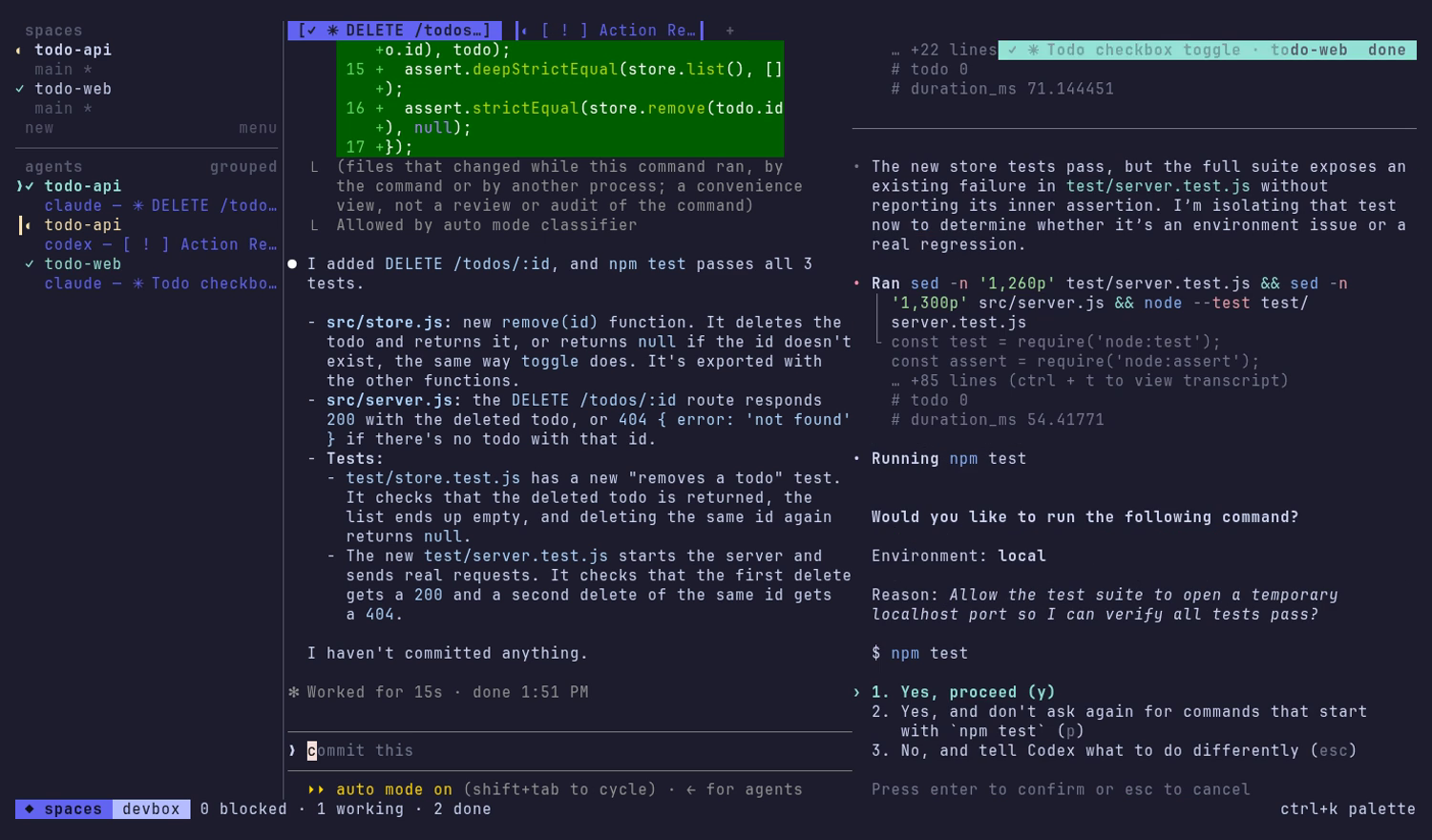
The sidebar lists your spaces and every agent in them, along with what each agent is doing right now:
×blocked: waiting on you for a question, a permission or a choice◐working: thinking, editing, running commands✓done: finished something you haven't looked at yet○idle: ready for the next prompt
When an agent in another pane blocks or finishes, a toast pops up. Click it and you're there. For a git repo, the sidebar also shows the space's branch, ahead/behind counts and whether the tree is dirty. You stop cycling through tabs looking for the agent that's been waiting on you for ten minutes.
State detection ships for Claude Code, Codex CLI, Gemini CLI and Aider. The rules are declarative data rather than code, you can override them locally, and they update daily, so a CLI that changes its prompt doesn't have to wait for a Spaces release.
Tabs, a split view, and a menu for everything else
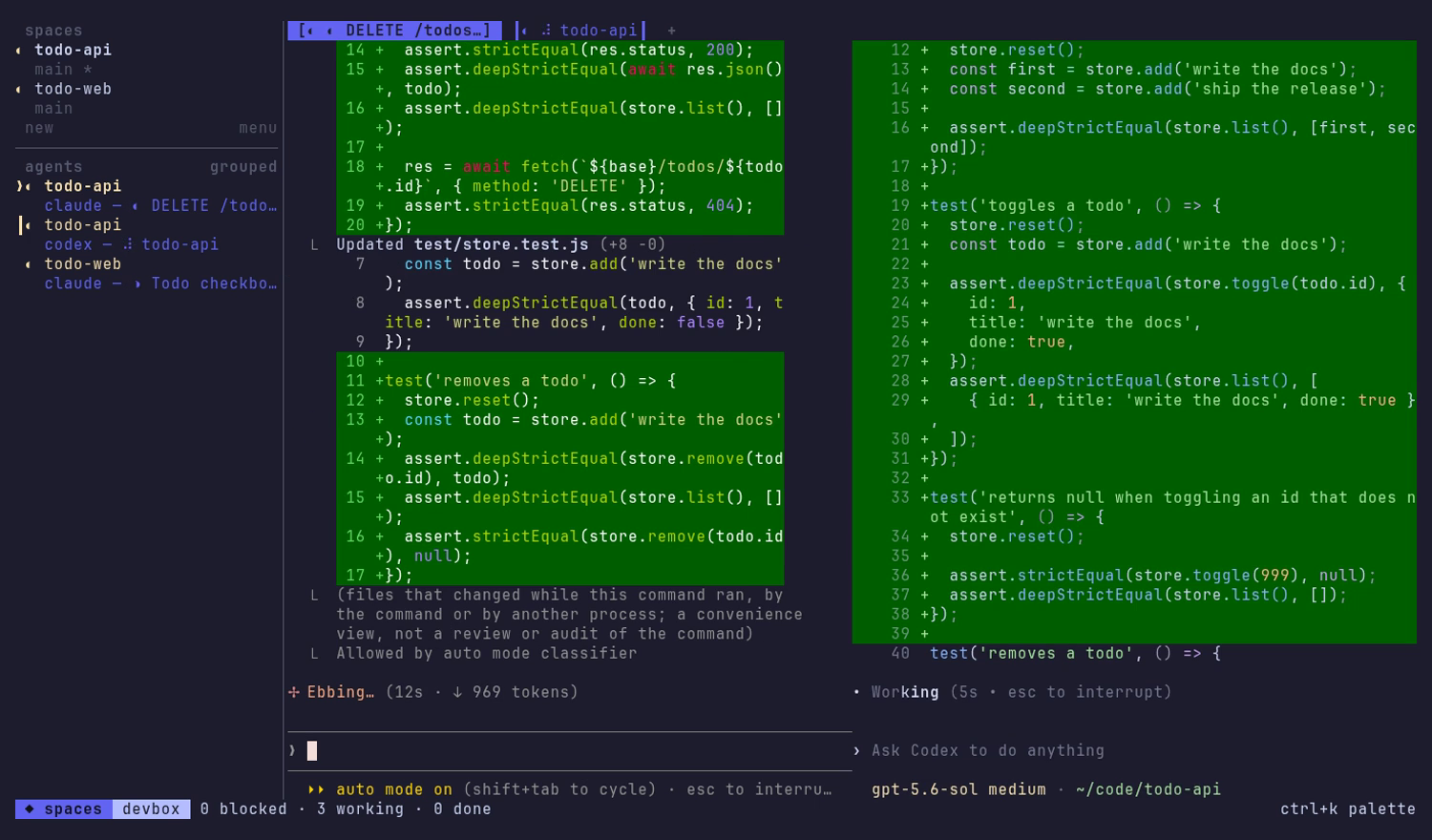
Each space keeps its agents as tabs. ctrl+space s splits the view so you
can watch two at once. ctrl+k opens a menu that creates and colors spaces,
starts agents, and restarts or closes panes. When you start an agent in a
folder, Spaces offers to resume one of that folder's past sessions.
Every other key, ctrl+c included, goes straight to the agent. Spaces stays
out of the way.
Files, without leaving the terminal
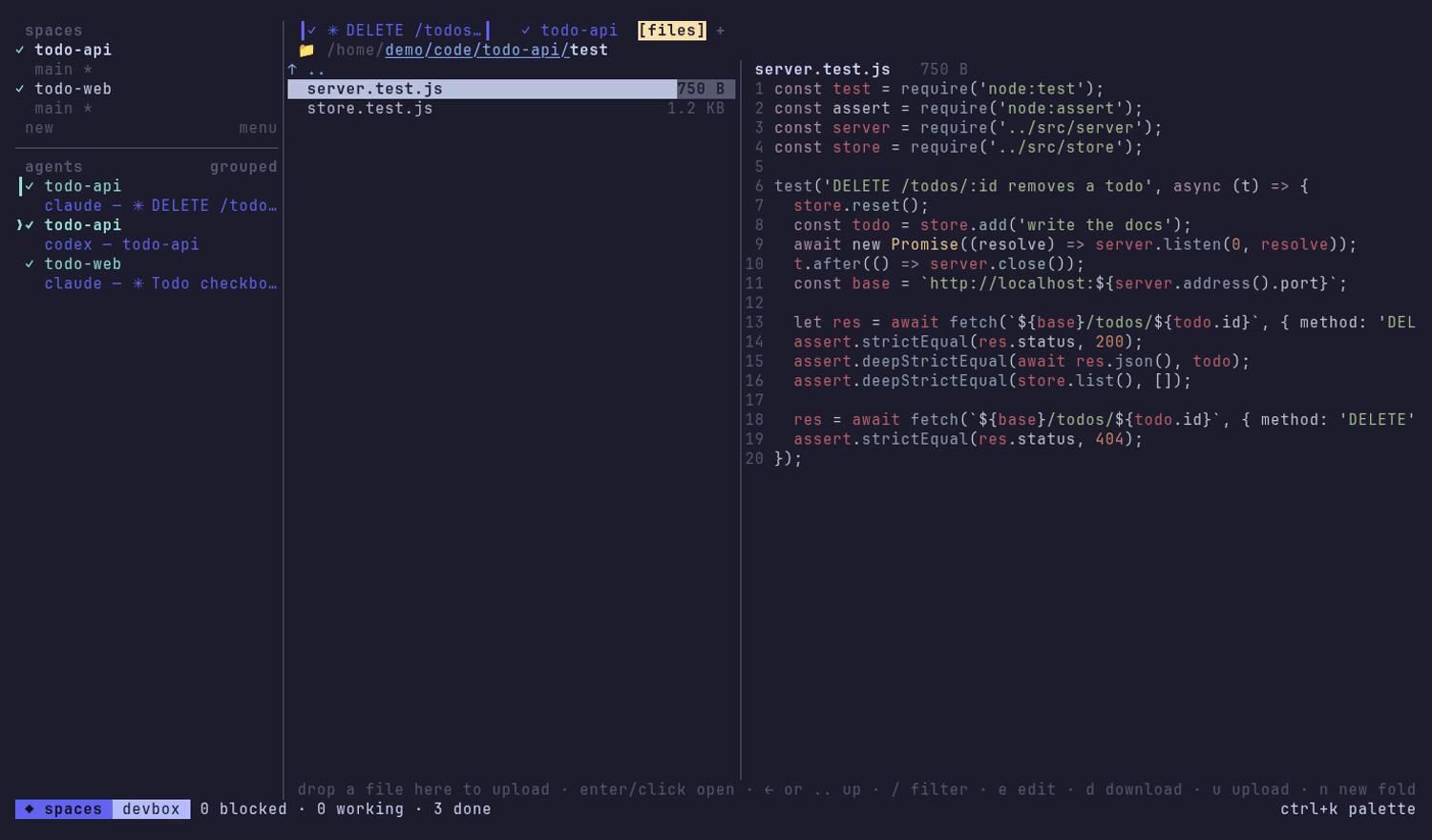
Every space has a Files tab for the machine it runs on. You can browse with
a live, syntax-highlighted preview, edit a file and save with ctrl+s (a
save is refused if someone, or some agent, changed the file under you), and
drag files from your desktop onto the tab to upload them. You can download
whole folders, rename, move and delete. When an agent says "I put the report
in out/", you can read it without opening another tool.
Detach. Come back. From anywhere.
Agents run on the Spaces server, not in your terminal window. ctrl+space d
detaches and leaves everything running. Run spaces again and you're back
in the same sessions. If the machine reboots, panes start again when you
open their space, and Claude Code picks its conversation back up.
For the box you reach over SSH:
spaces --remote you@devbox
That connects your local terminal client to Spaces on devbox through your
existing SSH setup: keys, agents, ~/.ssh/config aliases and jump hosts all
work. Nothing new listens on the network. The remote keeps its server on its
own loopback, and its secret never leaves it. If Spaces isn't installed
there, or is older than yours, --remote offers to install or update it.
Before an update, it tells you how many running agents the update would
stop. If the box asks for a password, it offers to set up a key so it
doesn't ask again.
The browser is still there when you want it
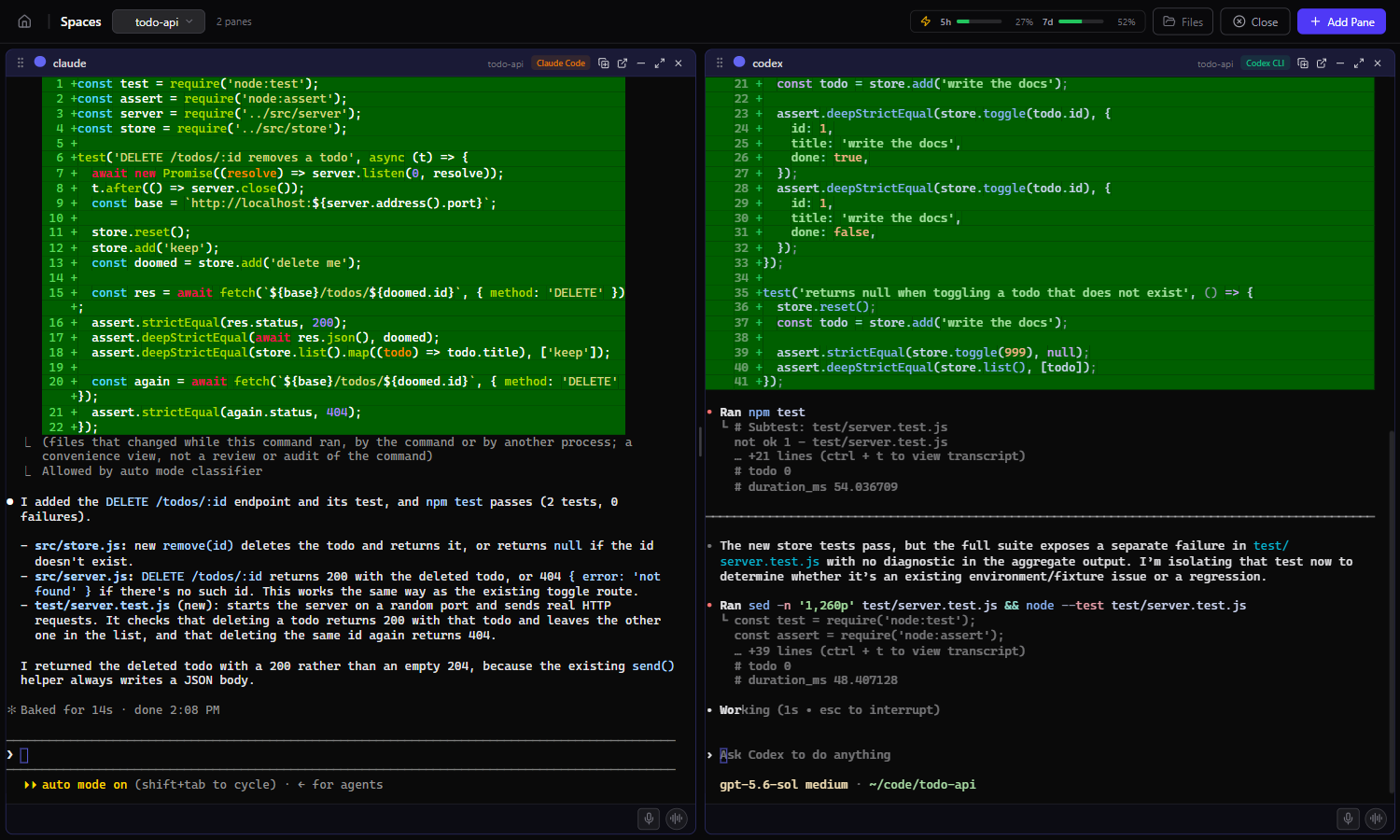
spaces open signs your browser in and shows the same spaces as a grid of
terminals. These aren't copies: they're the same live agents. Start
something in the terminal and finish it on the big monitor, or check in
from your phone at /m. Changes on one side show up on the other within
about a second. spaces open --remote you@devbox does the same for a remote
machine, through an SSH tunnel.
The web app also has what suits a bigger screen:
- Session history: every past Claude Code, Codex, Gemini CLI and Aider session, indexed locally with full-text search, and you can jump back into any of them.
- A usage dashboard: sessions, token use by model, an activity heatmap and cost estimates, all computed from your own history.
Agents that talk to each other
Panes in the same space share a message bus. An agent can post "API is done,
schema in docs/api.md" for the frontend agent to read. It can also ask you
for approval before it does something drastic:
spaces-msg post --to frontend "endpoints are live on :8080"
spaces-msg request "OK to drop the legacy table?"
Turn on collaboration for a space and Spaces also registers the bus as an MCP server for Claude Code and Codex, so they can use it without being told the commands.
Spaces and herdr
If you've been following this space (sorry), you've probably seen herdr. It's a good tool, and it proved that a lot of people want an agent-aware terminal multiplexer. Both tools keep agents in persistent panes, show which ones are blocked, working, done or idle, and let you reattach over SSH. Here's where they differ:
| Spaces | herdr | |
|---|---|---|
| Terminal client | Yes | Yes |
| Same live agents in a browser | Yes (spaces open, phone layout at /m) |
Not in the core tool |
| Searchable history of past agent sessions | Yes, across Claude Code, Codex, Gemini CLI and Aider | No |
| Usage and cost dashboard | Yes | No |
| Built-in file browser and editor | Yes, the Files tab | Through a community plugin |
| Agent-to-agent messages | Built-in bus, spaces-msg and MCP |
Scriptable socket API |
| Remote over SSH | Yes, and it installs or updates Spaces on the remote | Yes |
| Windows | Prebuilt client | Beta |
| License | Apache-2.0 | AGPL-3.0 |
herdr is a single Rust binary with a plugin ecosystem and integrations for more agents. If you want the leanest possible multiplexer and plan to script the rest, it's a great choice. Spaces is for people who want the whole workspace: the terminal client, plus history, search, usage, files and a browser view of the same agents, under a license your company's lawyers will sign off on.
(Comparison as of October 2026, from herdr's docs and published reviews. Both projects move fast. Tell us if anything here is out of date and we'll fix it.)
Yours alone
Spaces runs on your machine and answers only you. The server listens on loopback, every request must prove it comes from your account, and other users on the same machine get nothing. It doesn't send your code, prompts or history anywhere, and the published package has no analytics. The agents talk to their own vendors as usual, signed in the way you already signed them in. Spaces needs no new accounts and no API keys of its own.
It's open source under Apache-2.0, so you can read every line that runs your agents.
Try it
npm install -g @jlongo78/agent-spaces
spaces
You'll need Node.js 20.9 or newer. On Linux, you'll also need a C++
toolchain for node-pty (sudo apt install build-essential python3).
macOS and Windows use prebuilt binaries.
Press ctrl+k, create a space, start an agent, and go get a coffee. It'll
tell you when it needs you.